Hi all,
I’d like to introduce WarpTune Desktop, a free and open-source tuner for small miners. It runs on a computer that is on anyway in your home network, and it does one thing: find the lowest core voltage at which each chip still runs without errors, and keep it there.
What it does:
- Calibration by button. It measures each voltage step on 200 real shares and the chips’ own error counters, adds a 20 mV reserve, and waits for you to apply the result.
- It works on any pool. WarpTune reads the accepted shares and their difficulty from the miner itself, so you don’t need a pool of your own. (If you run dvb-WarpPool, it uses the pool’s numbers and adds reject reasons.)
- An optional clock search looks for a higher clock at the same voltage.
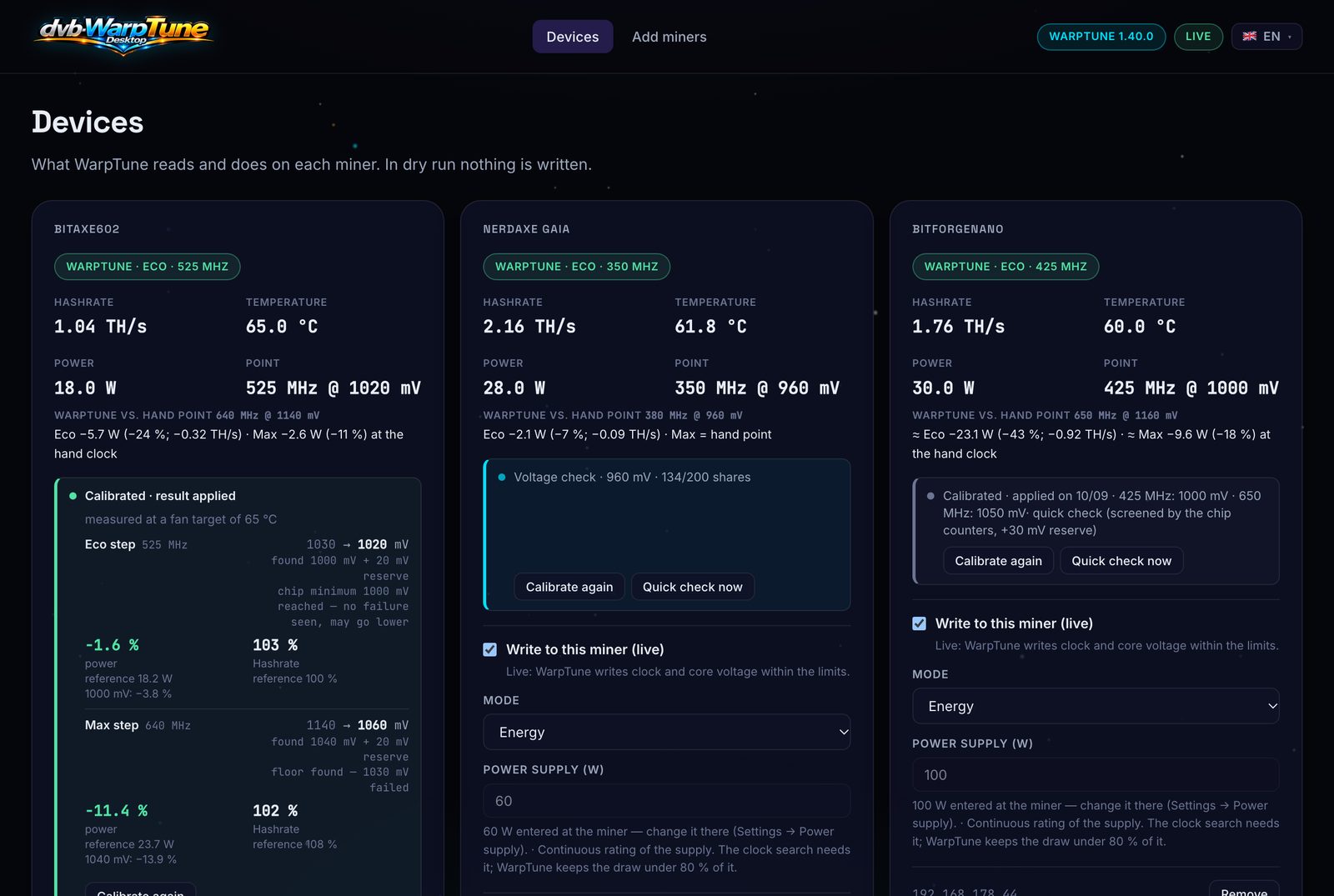
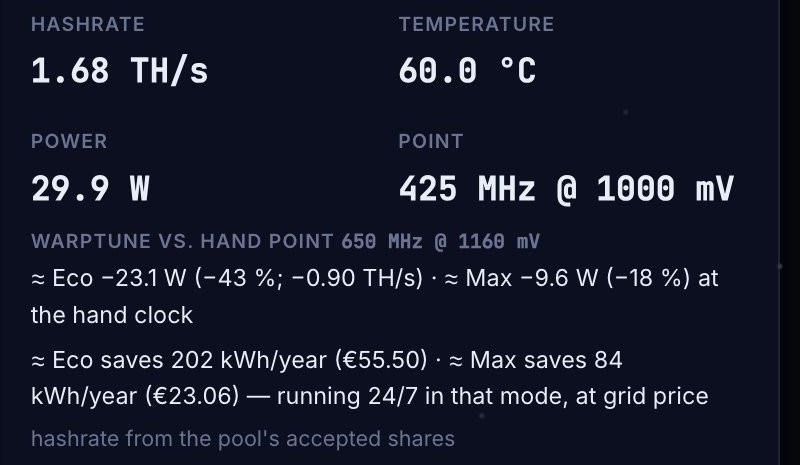
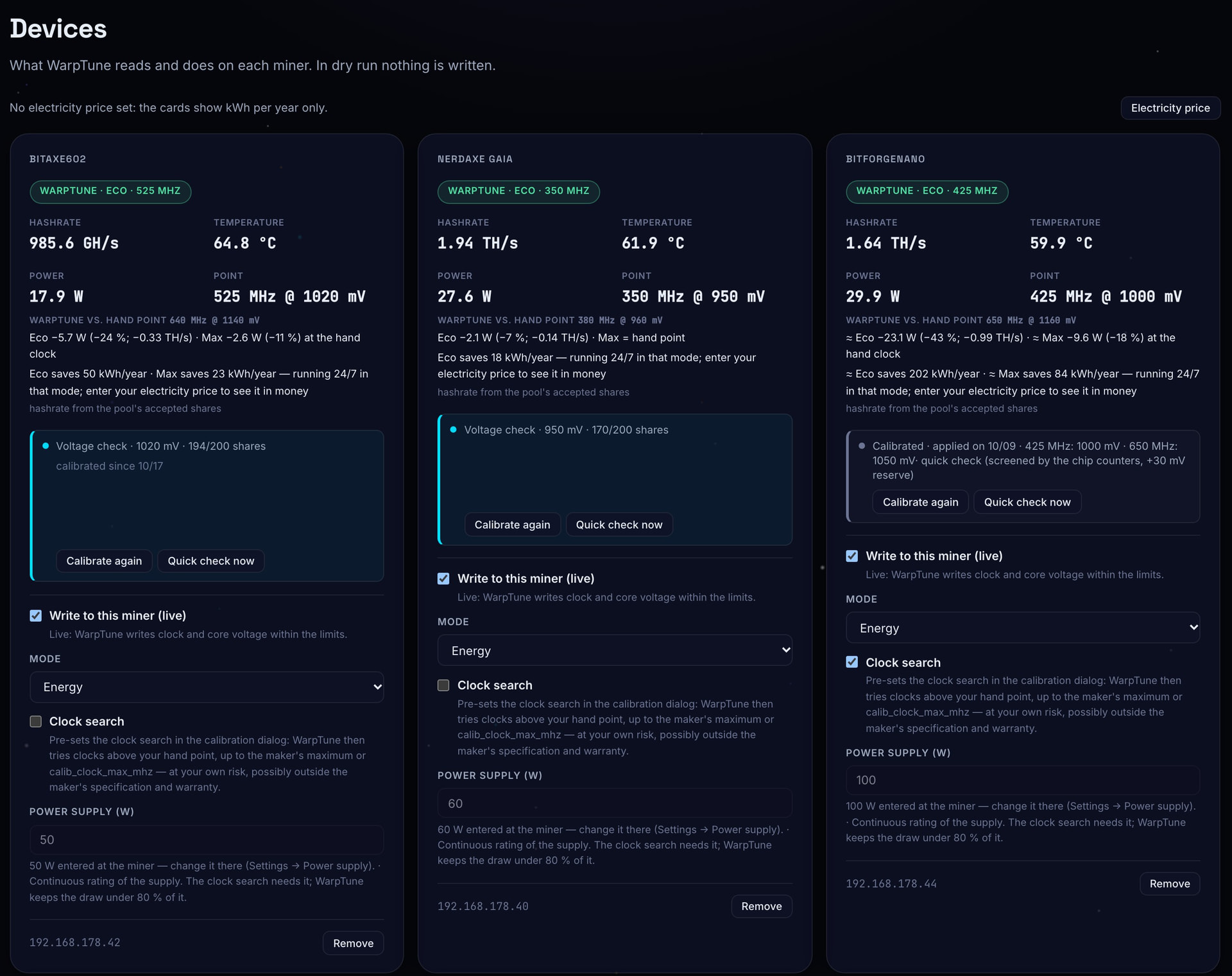
- Every miner’s card compares WarpTune with your own settings in watts and hashrate, and, if you enter your electricity price, what that means per year.
What it never does:
- go above the core voltage you set by hand
- go below the regulator’s clean range
- draw more than 90 % of the board’s or 80 % of the power supply’s rating
New miners start in a dry run. WarpTune only watches and keeps a journal until you switch a miner live, and that switch asks once and names every limit.
My own numbers, same clock and same hashrate:
- BitForge Nano at 650 MHz: 52.1 W → 43.7 W (−16 %), about 74 kWh a year
- Bitaxe Gamma at 640 MHz: 23.7 W → 21.0 W (−11 %), about 24 kWh a year
At my 27 ct/kWh that’s roughly €20 and €6.50 a year. How much you save depends on the chip and your electricity price.
Miners: Bitaxe, NerdAxe, NerdQAxe++, NerdOctaxe and BitForge Nano with AxeOS, NerdOS or WarpAxe firmware (recent versions that report the pool difficulty); an Avalon Q through its work modes. A setup assistant finds them in your network.
There’s an app for macOS, an installer for Windows (no admin rights) and .deb/AppImage for Linux. The downloads aren’t signed with a paid Apple or Microsoft certificate, so the first start needs one or two extra clicks. There’s a picture guide for it, and every release has SHA256SUMS with a cosign signature.
Overview and downloads: WarpTune Desktop — keeps each Bitcoin miner at its best point
First start, with pictures: WarpTune Desktop: First Start - dvb-WarpPool
Manual: WarpTune Desktop — Installation & User Manual (free PDF)
If your board or firmware isn’t on the list, I’d like to hear how it goes. Logs and questions are welcome here.
Eco runs at a lower clock. At the same clock the Nano saves 84 kWh a year.
Update v1.42 – WarpTune says why it paused
A small update. If WarpTune stops writing to a miner on its own, for example because its write breaker saw too many writes in an hour, the card now names the reason and the time, and “Switch writes on again” resumes it without restarting anything. A miner restart no longer counts against that breaker. WarpTune also reads the stop limits WarpAxe reports and brakes 1 °C before the firmware does, and it is ready for the upcoming WarpAxe self-test. Downloads as before: WarpTune Desktop — keeps each Bitcoin miner at its sweet spot
Update v1.42.1: a small fix. After a WarpAxe self-test, WarpTune stopped tuning that miner. Fixed – please update before the upcoming WarpAxe v0.1.34. Downloads as before: WarpTune Desktop — keeps each Bitcoin miner at its sweet spot
State October 2026 – what WarpTune can do today
The first post of this thread is from v1.41 and can’t be edited any more, so here is the current state in one place for anyone who finds the thread now.
What it does. For each of your miners, WarpTune finds the lowest error-free core voltage, adds a small safety reserve, and keeps the miner there. It’s free and open source, and it runs on a computer that is on anyway in your home network.
Miners and firmware
- Bitaxe, NerdAxe, NerdAxe Gaia, NerdQAxe++, NerdOctaxe and BitForge Nano on AxeOS (ESP-Miner), NerdOS, Forge-OS or WarpAxe. What each firmware reports, and what WarpTune does with it, is in a table in the manual.
- An Avalon Q through its three work modes; WarpTune never touches its clock or voltage.
Calibration
- One button per miner. Each 10 mV step is judged on 200 accepted shares and the chips’ error counters; the result, with a small safety reserve on top, waits for you to apply it.
- Works on any pool: WarpTune reads the accepted shares and their difficulty from the miner itself. With dvb-WarpPool it uses the pool’s numbers and tells reject reasons apart.
- Optional clock search for a higher clock at the same voltage, a quick check, and a re-check four weeks after an apply on a miner in Max.
What it shows
- Every card compares WarpTune with your own settings, in watts and hashrate, measured on accepted shares.
- Enter your electricity price and it shows the saving per year in kWh and money.
- My own numbers at the same clock and hashrate: BitForge Nano 52.1 W → 43.7 W (−16 %), Bitaxe Gamma 23.7 W → 21.0 W (−11 %).
What it never does
- go above the core voltage you set by hand
- go below the voltage regulator’s clean range
- draw more than 90 % of the board’s or 80 % of the power supply’s rating
New miners start in a dry run; the live switch asks first and names its limits. Every write is read back, every stop puts your own settings back, and a breaker stops writing after too many writes – since v1.42 the card says why and one button resumes.
Where it runs. WarpTune Desktop: an app for macOS, an installer for Windows (no admin rights), .deb and AppImage for Linux, with a setup assistant that finds the miners. Or as a service next to dvb-WarpPool. The downloads aren’t signed with a paid certificate; there’s a picture guide for the first start, and every release has SHA256SUMS with a cosign signature.
Highlights of the last weeks: WarpTune Desktop (v1.40), calibration on any pool and the saving in money (v1.41), the breaker reason with a resume button and respect for the WarpAxe self-test (v1.42).
Honestly: it saves power, it doesn’t find extra blocks, and how much it saves depends on the chip and your electricity price.
Overview and downloads: WarpTune Desktop — keeps each Bitcoin miner at its sweet spot
Manual: WarpTune Desktop — Installation & User Manual (free PDF)
Update v1.43 – WarpTune in your language
WarpTune Desktop now explains itself in your language. Why it made its last decision for a miner, what the calibration found and why a voltage step failed, status hints and refused starts were English sentences inside an otherwise translated page; now they read in all eight UI languages. The calibration dialog also works on phones again. Downloads as before: WarpTune Desktop — keeps each Bitcoin miner at its sweet spot
OSMU Discord #bitaxe-general (follow-up, no links, never “web flasher”)
WarpTune Desktop update: its reasons (why it moved a miner, what the calibration found) now read in all eight UI languages instead of English, and the calibration dialog works on phones again. Same page as before, warppool dot org slash warptune.
Update v1.46.1 – what’s new since v1.43
Most of it is for the Avalon Q:
- Schedule: off-windows (standby) and quiet windows (Eco with a fan cap), every day or on chosen weekdays. The wake time is stored in the miner before it goes to sleep, so it wakes on time even when your computer sleeps.
- Standby instead of Eco on grid power: in Energy mode with a solar source, the Avalon can sleep while there is no solar surplus and wake up when there is enough for more than Eco.
- Optional hang watchdog: it restarts an Avalon that is awake and gets work but shows no hashrate for 10 minutes (at most once an hour and three times a day). It does not reboot when the pool or node is down.
- The card shows more: standby and wake time, the schedule, the hardware error rate, the fan and the power supply, and the hours in Super on solar surplus and in standby over the last 7 days. The pool’s pages show “Standby until HH:MM” instead of a fault.
- v1.46.1 fixes two bugs from our own live test: WarpTune now clears the standby times it set after every wake, also when the Avalon wakes itself (your own times from the Avalon app stay), and it waits for the hashrate instead of mistaking the warm-up for a dead chip.
All of it is off until you set it up in the Avalon’s settings on its card.
For all miners: the solar-surplus reserve can now be set per miner in the config file, so a small miner can switch to Max on less surplus than an Avalon needs.
Downloads as before: WarpTune Desktop — keeps each Bitcoin miner at its sweet spot
Update v1.47.0 – a silent chip, and Save applies at once
If a single chip on a board goes silent, WarpTune judges the hashrate on the chips still running instead of lowering the clock. With WarpAxe firmware the firmware restarts the chain; with stock firmware WarpTune restarts the miner, at most once an hour. The current, voltage and power protections act within seconds after a change, and after a reboot in Eco the miner goes straight to its Eco point. In the Desktop app, Save now applies at once for that one miner, and the electricity price comes from the pool if you have not set one. Downloads as before: WarpTune Desktop — keeps each Bitcoin miner at its sweet spot
Update v1.48.0 – calibration as a curve
The calibration now measures a clock–voltage curve: the lowest stable voltage at several clocks, and the clock with the best J/TH becomes the Eco clock. On my NerdQAxe++ that was 590 MHz instead of 600. With WarpAxe v0.1.41 WarpTune and the firmware hand over cleanly (heartbeat; the firmware takes over again if WarpTune stops), and on the way down the clock always goes first, the voltage after. Downloads as before: WarpTune Desktop — keeps each Bitcoin miner at its sweet spot
Update v1.49.0 – Avalon Q chips and a crash fix
For an Avalon Q the card now has a folding Chips box: all 160 chips with temperature, voltage and a status (ok, weak, dead) from each chip’s work against the board, read-only on the stock firmware; weak needs about 3 hours of history. The error lines now follow the chip type in the regulation too (BM1370 1.5 %, BM1373 7 %), and the Desktop page no longer crashes after a curve calibration with several Eco stages. Downloads as before: WarpTune Desktop — keeps each Bitcoin miner at its sweet spot